
New entry. Search for ads. B2B.
Starting with the preparation of the opening of the account, the first Google search advertisement was created in a step-by-step manner. This paper, which combines the input operational cut-off, helps the B side of foreign trade to clean up the whole delivery process.
Read the alarm: The screenshot is an example of a historical interface, with different back-office options. The bid, network and budget should be combined with business and data selection, and should not commit to ranking or conversion effects.
Pre-start: prepare B keywords and conversion tracking
Let's share how we can create the first Google search ad as a newcomer. After the Google Ads account is opened, the target market, the product drop-off page, the B-end keyword, and the query or order conversion that can be properly recorded.
If you haven't opened an account, read it first. Google Ads has a common problem with opening accounts. I'm sorry. The B2B search advertising for foreign trade, for example, does not mean that all operations should use the same set-up.
Step 1-5: Create series, select target and name
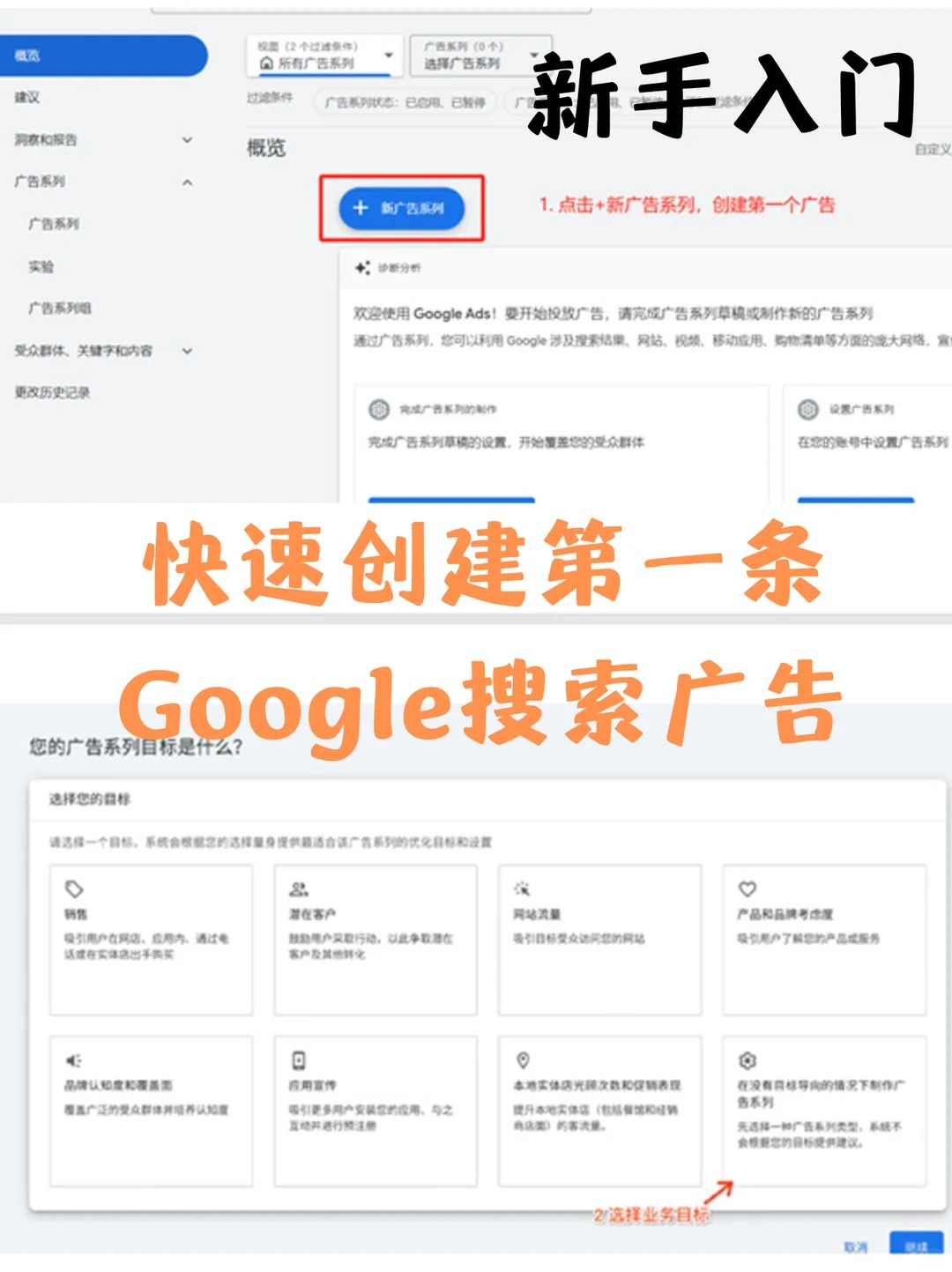
- Click "+ Create" in the back of Google Ads to select a new ad series.
- Select “potential customers” or “create an advertising series without target guidance” and continue as a reminder.
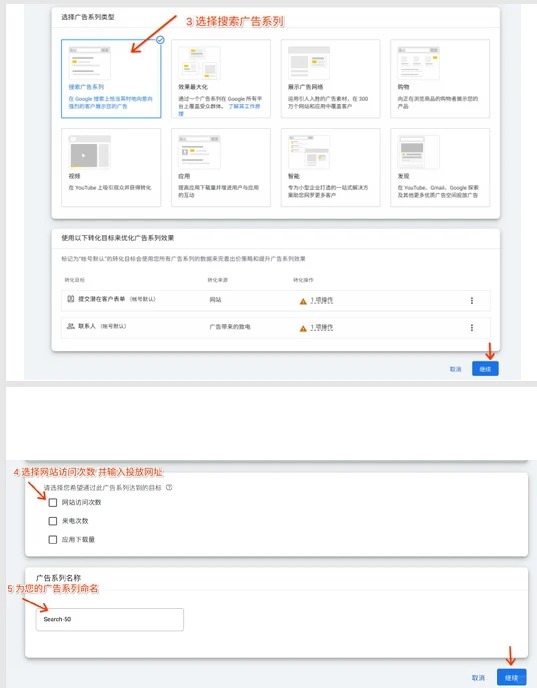
- Select the “search” advertising series to take on the demand for the user to search for the product or service.
- Website visits, calls or potential clients are selected on the basis of actual needs. While some steps could be taken to leave the web site unfilled, the final advertisement must be configured for effective end-to-end access.
- Naming the series. For example, “01-Search-Packaging-US”, which uses numbering, type of delivery, product and market-friendly management; This is a recommendation for naming, not an international mandatory standard.
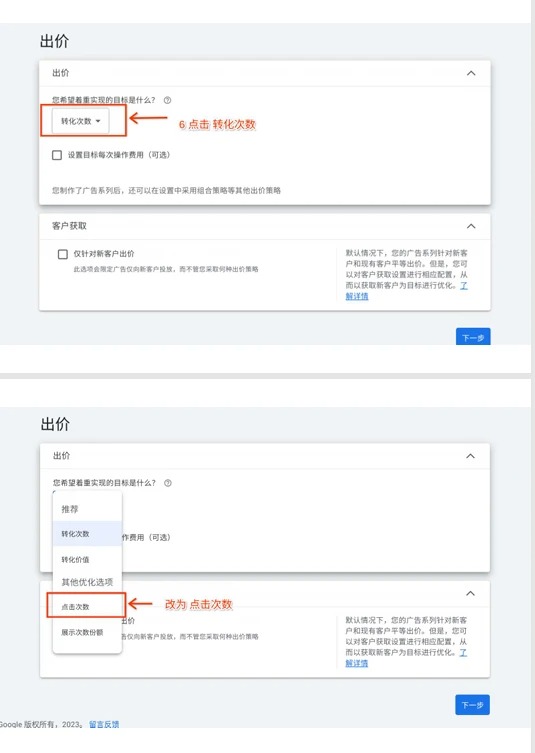
Step 6: Selection of offers
" Get as many hits as you can " focuses on getting hits and " get as many conversions as you can " on the configured conversion target. Clicking is not necessarily low quality, and conversion offers do not guarantee an increase in queries: keyword intent, droppage is as critical as tracking accuracy.
The newcomers should first check whether the conversion action is real and effective and then choose a strategy based on operational objectives and data. Do not fill out the target CPA at will when there is no sufficient basis; The use of target values should be combined with acceptable cost of access and historical performance, rather than copying others ' figures.
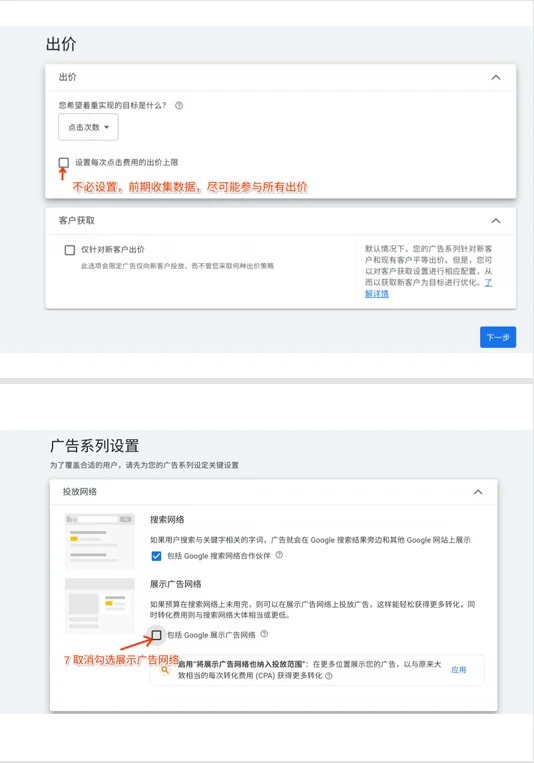
Step 7: Check the drop-in network
If you want to focus on Google search traffic in the first round, you can check the search partners and display network options separately. Whether or not to activate should be judged in terms of operational objectives and the effectiveness of the sub-networks, it cannot be assumed that these networks are necessarily inaccurate.
Note: Searching for partners is not the same as Google searches per se; When creating the search series, the core Google search traffic is not cancelled. The map shows the interface at the time and the options may change.
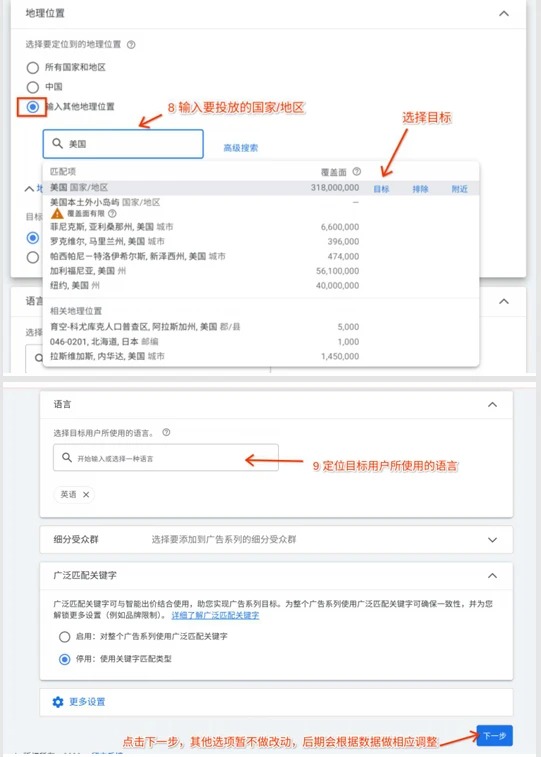
Steps 8-9: Establishment of national, regional and linguistic settings
Enter the country or area where the preparatory service is to be provided, and then exclude the unserviceable market by the actual operation. Global orientation does not mean that all countries must be selected; Comparable testing could be built around a clear market.
Area exclusion does not recognize all “peerships”. Advanced options for geographical location will also be examined, distinguishing between the physical location of the target area and the users interested in that area.
The language is based on the content of the ad and landing page that the client understands. English may be combined with the target market language, but advertising, landing pages and passenger service should be able to accommodate the corresponding language; Do not add all languages blindly simply because of a country.
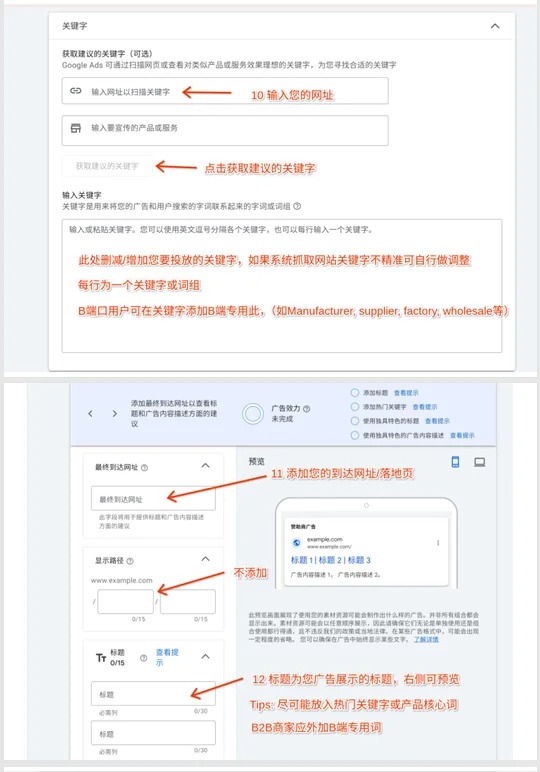
Step 10-11: Keywords and Landscape Page
Keywords help to determine which related searches the advertisement can be involved in. The B-end business can study the words manufacturer, subplier, factory,wholesale, etc., before they are classified by product and intent, but instead of adding these words, the B-end customer is certain.
The combination of matching, search-word reporting and denial of keywords reduces unrelated flows and does not rely solely on system recommendations. An advertising group tries to organize around clear themes.
The final arrival should point to pages that are consistent with keywords and advertising commitments. Specialized land pages tend to be easier to control the experience; The first page or classification page may also be used, provided that it is relevant, accessible, complete and easily submitted.
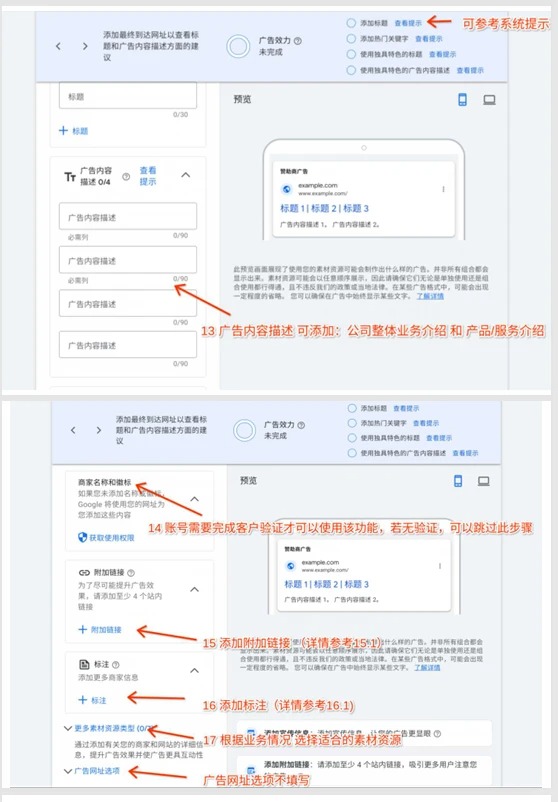
Step 12-13: Filling out advertising titles and descriptions
Responsive search advertisements usually provide at least three titles, two descriptions, up to 15 headings and four descriptions. heading with a maximum of 30 characters per article, describing a maximum of 90 characters per article; Double-width characters such as Chinese are calculated on the basis of two characters, whichever is later.
Titles can be combined with core product terms, B-end services, real advantages and action tips. Do not mechanize keywords or overstate promises; Filling is not the same as getting better. The title and description will be displayed in combination, and the first three entries do not guarantee a fixed order of appearance.
Consistent “search intent - advertisement - land-page products”, describing additional services, terms of delivery or credible advantages, and avoiding only generic corporate presentations.
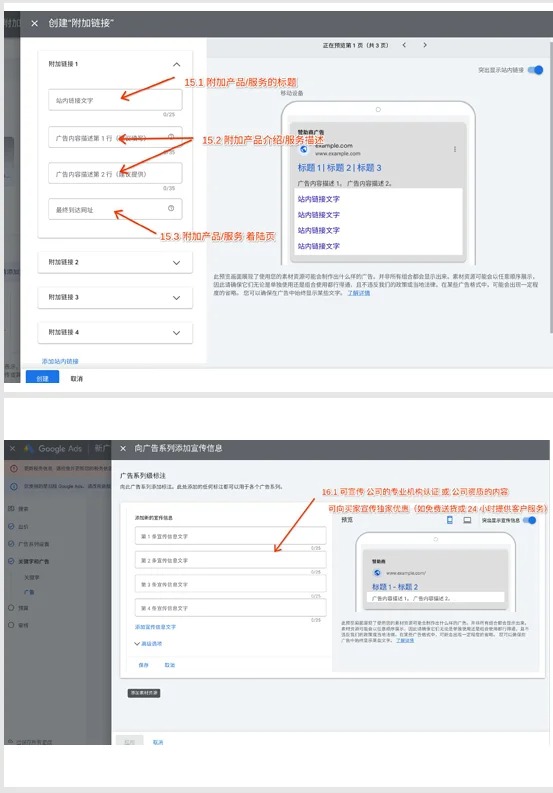
Step 14: Add additional links, labels and business information
Additional links may be to products, cases, services or contact pages; Each link should have a clear purpose and be relevant to user needs. The labels can write real selling points, such as support for customization, service time or distribution conditions.
The link text and the description of the common upper limit is 25 characters, and the other fields are required; The Chinese equivalent is counted later. Telephone calls, business names and logos must meet the corresponding eligibility and certification requirements and do not fill in false information.
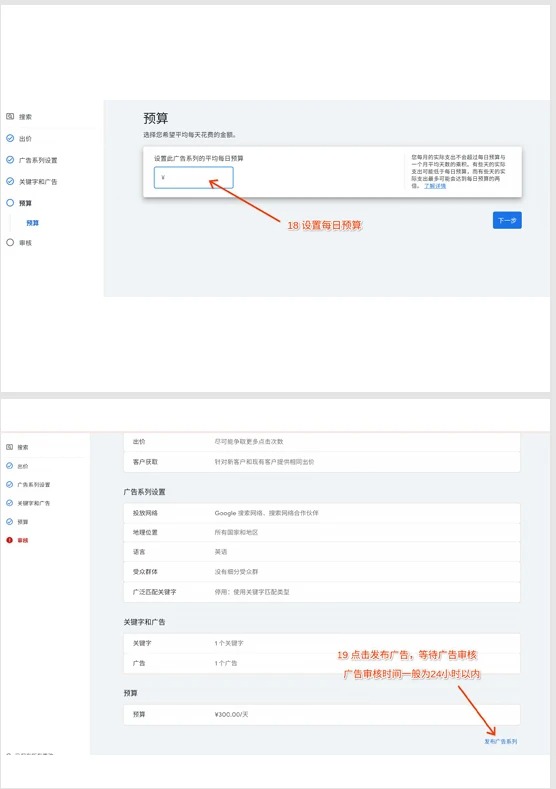
Step 15: Budgeting, inspection and submission
Budgets are based on their own testing capacity, target markets and acceptable costs, and system recommendations are only references. The budget is not a switch on advertising, and higher budgets are not guaranteed first; The ranking is also related to factors such as bid, advertising and landing page quality, competition and search situations.
When using the average daily budget, actual daily costs may fluctuate and should not be understood as accurately spending the same amount on a daily basis. Check countries, languages, networks, keywords, web sites, case files, conversion targets and payment settings before submission.
Submitted for review. The approval does not amount to an immediate demonstration or transformation, but also to payment, eligibility and conditions of release; The processing time is based on the actual status of the account.
On-line: First look at a valid query, then optimize it.
The first ad is on the line and it's just the beginning. Check if the tracking is normal and combines search words, costs, valid queries, value of orders and transformation delay judgement to avoid frequent and simultaneous changes to all settings.
Keep reading. Google Ads self-involved course with 2026 Baseline Interpretation I'm sorry. Execute support required, available Google Advertisement Service(b) The use of the Internet; Advertising places and Google SEO's natural ranking are different systems.
I hope this piece will help you to stay out of your way. Your recognition is the driving force behind my continued sharing and creativity.
Official references: Responsive search ads, Advertising ranking and top show.